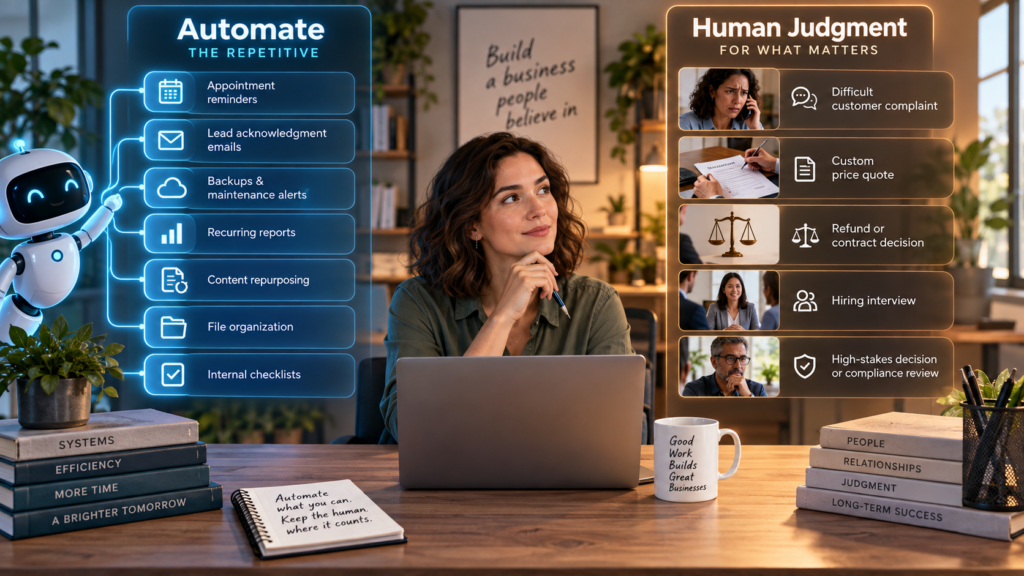
Automation is at its best when nobody misses the task after it is gone. If a computer can move information, send a routine reminder, resize an image or prepare a report without creating new problems, the business gets time back and nobody feels as if a relationship has been replaced by a flowchart.
The trouble begins when businesses automate whatever is easiest to connect rather than what is actually sensible to automate. The goal is not the largest number of workflows. The goal is fewer repetitive jobs, fewer preventable mistakes and more human attention available for work that benefits from judgment.
1. Automate Appointment Reminders
Reminder emails and texts are ideal automation targets because the rules are simple and the value is obvious. Send confirmation when the appointment is booked, remind the customer at an appropriate interval, and include the location or rescheduling instructions. A person should not have to remember to send the same message twenty times a week.
2. Automate Routine Lead Acknowledgment
When somebody submits a contact form, an immediate acknowledgment can confirm that the message arrived and explain when a human will respond. That is useful automation because it sets expectations without pretending the inquiry has already been evaluated.
The mistake is turning that acknowledgment into a fake sales conversation. “We received your request and will respond tomorrow” is helpful. “We analyzed your needs and your perfect package is…” is risky when nobody has read the request yet.
3. Automate Backups and Basic Maintenance Alerts
Websites, databases and business files should not depend on somebody remembering that today is backup day. Scheduled backups, uptime monitoring, security alerts and software-update notifications are exactly the kind of background work computers handle well.
Automation should still produce something a human can understand when it fails. A backup process that has been quietly broken for six months is not a backup strategy; it is optimism with a progress bar.
4. Automate Repetitive Reporting
If the business builds the same weekly report from the same sources, automate the collection and first draft. Website traffic, form submissions, sales totals, campaign activity and recurring operational metrics can often be assembled automatically so the human spends time interpreting the numbers instead of copying them.
5. Automate Content Repurposing Drafts
A finished article can become the starting point for a social post, newsletter paragraph, short summary or FAQ. AI can produce those variations quickly. The human should still decide which version sounds like the business and whether the shorter format accidentally removes important context.
6. Automate File and Data Organization
Renaming files, moving completed forms into the right folder, applying tags, extracting standard fields and formatting data are excellent workflow tasks. The work is repetitive, rules-based and easy to check. This is the boring automation that quietly saves hours.
7. Automate Internal Checklists
When a sale closes, a new project starts or a new employee joins, automatically creating the correct checklist can prevent steps from being forgotten. The automation does not have to do the job. It simply makes sure the right work appears in front of the right person.
Now the Five Things to Be Careful Automating
Some tasks look automatable because software can technically perform them. That is not the same thing as saying the business should remove the human.
1. Difficult Customer Complaints
AI can summarize the history and draft a response, but an angry or unusual customer often needs judgment, context and authority. A rigid automated sequence can turn a solvable problem into a public review.
2. Pricing and Custom Quotes
If every job is standardized, automation may be safe. If pricing depends on condition, scope, travel, risk or unusual customer needs, automatic quoting can create promises the business regrets. Use automation to collect the information; let the responsible person decide the price.
3. Refunds, Credits and Contract Changes
Money and obligations deserve a clear approval point. A workflow can flag an eligible request or prepare the paperwork, but the final action should follow rules the business has deliberately chosen rather than whatever an AI model inferred from the conversation.
4. Hiring and Firing Decisions
AI can help organize applications or summarize notes, but employment decisions carry human, legal and reputational consequences. Treat software as an assistant, not an invisible manager nobody can question.
5. Anything Where Being Wrong Is Expensive
If the output affects safety, legal compliance, private data, major financial decisions or the business’s reputation, automation should increase review rather than remove it. Speed is not valuable when the mistake costs more time than the workflow saved.
Use a Simple Test Before Automating
Ask four questions. Is the task repetitive? Are the rules clear? Can the output be checked easily? Is the cost of a mistake low enough to tolerate? The more “yes” answers you have, the better the automation candidate.
If the task depends heavily on empathy, negotiation, unusual context or accountability, keep a person in the loop. Good automation removes drudgery. Bad automation removes the person customers actually needed.
The Bottom Line
The small business that wins with automation is not the one with the most glowing workflow diagrams. It is the one that stops wasting human attention on repeatable chores while keeping people involved where judgment creates value.
Automate the predictable. Assist the complicated. Own the decisions that matter.