AI video has reached the point where a small business no longer needs a production company, a professional camera crew, or a giant advertising budget simply to experiment with video content. That does not mean AI has suddenly made professional video production free, effortless, or foolproof. Anyone who has spent an afternoon generating clips knows that perfectly good credits can disappear while the AI changes somebody’s face, sends an object through a wall, or interprets “slow camera movement” as an invitation to recreate an earthquake. What has changed is that several major AI video platforms now offer enough free access for a small business owner to actually experiment before deciding whether any of these tools deserve a place on the monthly expense sheet.
That distinction matters. Small businesses are constantly being pitched subscriptions. Five dollars here, twenty dollars there, another $30 for something that looked useful in a Facebook advertisement, and suddenly the business is paying several hundred dollars every month for software that gets opened twice. AI video can become particularly expensive because most platforms use credits, and those credits are consumed every time something is generated. A failed experiment usually costs just as much as a successful one. The sensible approach is therefore not to begin by asking which AI video service has the biggest paid plan. Start by asking which companies will let you play with the technology long enough to determine whether you actually have a use for it.
As of September 2026, several platforms offer legitimate free entry points. Their limits and credit systems change frequently, so the numbers in this article should be treated as a snapshot rather than a permanent promise. Always check the current pricing or credit page before building a business workflow around any free service.
Google Flow: Probably the Best Free Playground Right Now
At the moment, Google Flow is one of the most generous places for a small business to begin experimenting with AI video. Google currently gives users without a Google AI subscription 50 Flow credits every day at no charge. Those free credits can be used with Veo 3.1 Lite, Fast, and Quality generations, although the models consume credits at different rates. Veo 3.1 Lite currently costs 10 credits per generation for four-, six-, or eight-second videos, while Fast costs 20 credits. That means somebody using the least expensive Veo 3.1 Lite option can theoretically produce around five free generations per day. Unused daily credits do not roll over, so this is very much a “use them or lose them” allowance.
For a small business, five short experiments every day is actually quite a lot if the goal is learning instead of immediately trying to produce a feature film. A restaurant could experiment with subtle motion from a photograph of a signature dish. A landscaping company could animate a project photograph for a social post. A salon could test promotional clips. A real-estate or automotive business could experiment with motion shots built from still photography. A local retailer could build short product teasers without first investing in another monthly subscription.
What makes Flow especially interesting is that it goes beyond simple text-to-video. The free version currently includes Frames to Video, including first-frame and first-and-last-frame workflows, Ingredients or References to Video, video extension, and other Flow tools. First-and-last-frame generation can be particularly useful when you already know how you want a scene to begin and end and want the AI to create the motion between them.
That makes Flow one of the first services I would recommend simply playing with.
There is an important lesson buried in Google’s pricing structure, though. Free users receive 50 credits every day, while some paid Google AI plans offer monthly credit pools instead. More expensive does not automatically mean “more experimentation per dollar” unless you understand how the credits are allocated and what models you intend to use. That is becoming a recurring theme throughout the AI industry: the price printed on the subscription page tells you only part of the story.
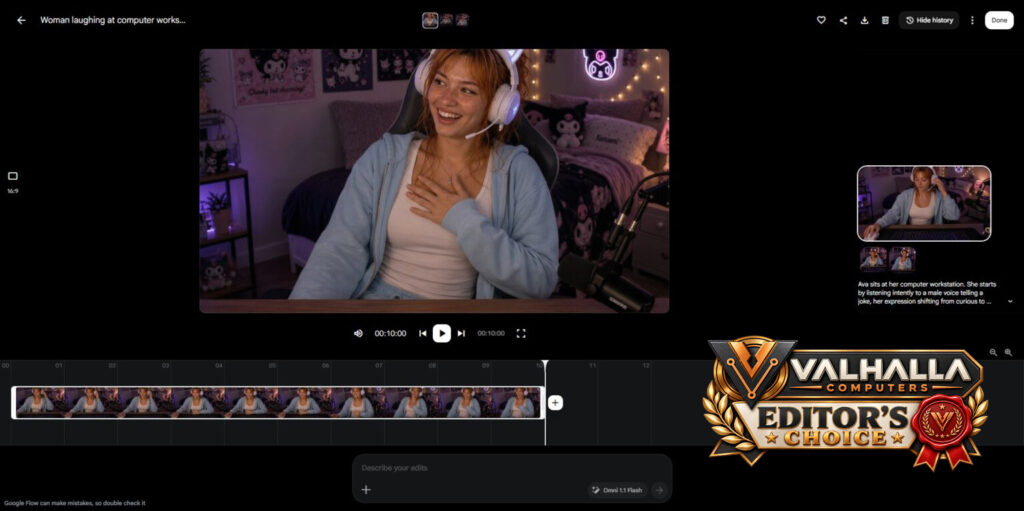
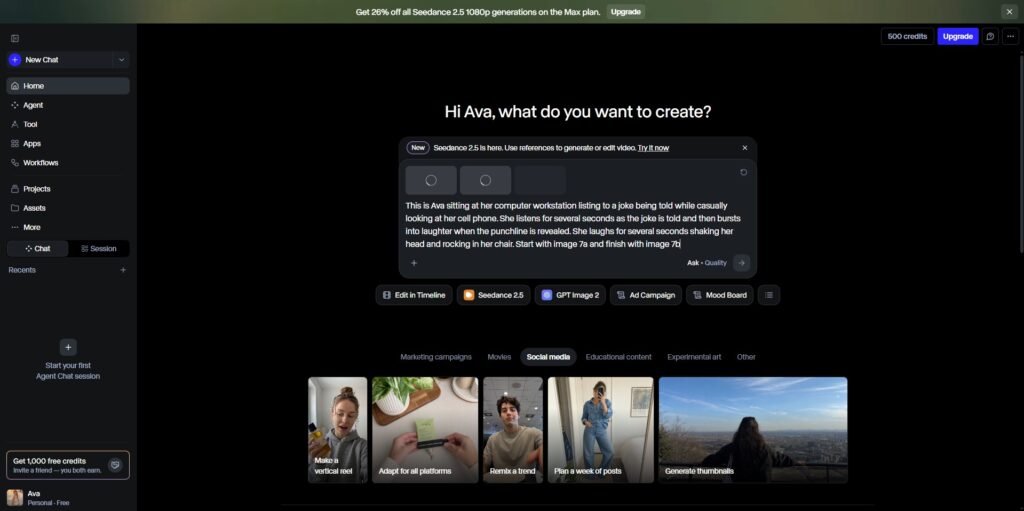
Google Flow User Interface – For this test I uploaded a start and end frame image and told it to render a video of Ava listening to a joke then finishing the punch line herself. This test run cost 15 credits to create a 10 second video which was remarkably well done aside from some lip synching issues.
Test One – 10 second video, 15 credits
Test Two – 10 second video, 15 credits
PixVerse: Sixty Free Credits Every Day
PixVerse is another platform worth bookmarking because its official documentation currently says users receive 60 credits each day, refreshing at midnight UTC. Those credits expire instead of accumulating, so you cannot disappear for a month and come back to a giant stockpile. The service says typical generations consume 20, 40, or 60 credits depending on the type and settings. Text-to-video, image-to-video, and upscaling all consume credits, and retries consume credits as well. Failed generations that do not process correctly are not supposed to deduct credits.
That means PixVerse is another useful daily experimentation platform rather than a free unlimited production studio. Depending on the generation selected, your daily allowance might buy one higher-cost attempt or several lower-cost ones. That is still enough to learn how the system handles movement, camera direction, image references, and prompting without handing over a credit card first.
For a small business, that is exactly what a free tier should accomplish. You do not need to produce forty finished advertisements on your first day. You need enough room to discover whether the technology can reliably represent your product, your people, your location, and your brand without creating more cleanup work than it saves.
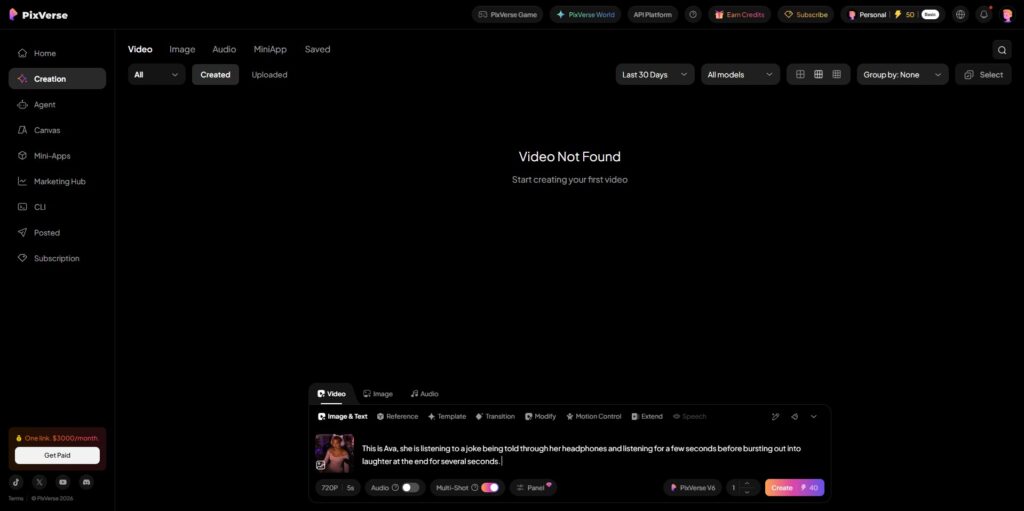
Pixverse User Interface – For this test I was only able to supply one image for the start frame and told it to render a video of Ava listening to a joke for several seconds then bursting out into laughter at the end for several more seconds. The cost for this 5 second video was 40 credits and no voices were provided like they were in Google Flow.
No sound with this test, used 40 credits for a 5 second video.
Pika: Smaller Allowance, but an Interesting Free Plan
Pika takes a different approach. Its current free Basic plan provides 80 video credits per month rather than refreshing every day. That is obviously less experimentation than Flow or PixVerse if you use those services consistently, but Pika’s cheaper Turbo actions can currently cost as little as 10 credits. The free tier includes access to Pika 2.5 at 480p along with tools such as Pikascenes, Pikadditions, Pikaswaps, Pikatwists, and image-to-video effects.
One detail that makes Pika particularly interesting for small-business experimentation is that its current pricing page says free users can download videos without a watermark and that commercial use is included on the free plan. That is worth noticing because many free AI services deliberately watermark output or restrict what can be done with free generations.
Eighty monthly credits still disappear quickly, so Pika is probably not where I would go to mindlessly regenerate a scene twenty times. It is better treated as another tool in the workshop. Test something there that Flow handled poorly. Try a different animation effect. Compare how two systems interpret the same source image. The purpose of the free plan is not to become loyal to Pika before you have used it. The purpose is to find out what Pika does better than the tools you already have.
Pika User Interface – For this test I uploaded a start image, this tool is very particular in what you can do for free so the image had to be resized down to 480p and you’re only allowed to create a 5 second video on the free tier. The cost for the video was 12 credits.
First test – 12 credits to create a 5 second video from only 1 start frame picture that needed to be scaled down to 480p for the free tier. No sound included.
Second test – 12 credits to create a 5 second video from only 1 start frame picture that needed to be scaled down to 480p for the free tier. No sound included.
Vidu: Another Useful Image-to-Video Test Bench
Vidu is also worth keeping on the list. Its current pricing information says new users can receive trial credits, and the service also awards credits through daily logins, events, competitions, and other activities. Vidu uses credits for generations, with costs varying substantially depending on model, resolution, duration, and type of video being created.
The reason Vidu interests me more than the raw number of free credits is the variety of workflows available. Its current generation system supports text-to-video, image-to-video, reference-to-video, and start-and-end-frame generation across different models. That makes it another useful place for businesses that already possess photographs and graphics rather than businesses trying to generate everything from scratch.
If your business already has a decent library of product photographs, staff images, vehicles, buildings, completed projects, food, merchandise, or promotional artwork, image-to-video may ultimately be much more useful than pure text-to-video anyway. You already own the visual starting point. The AI’s job is simply to add controlled movement.
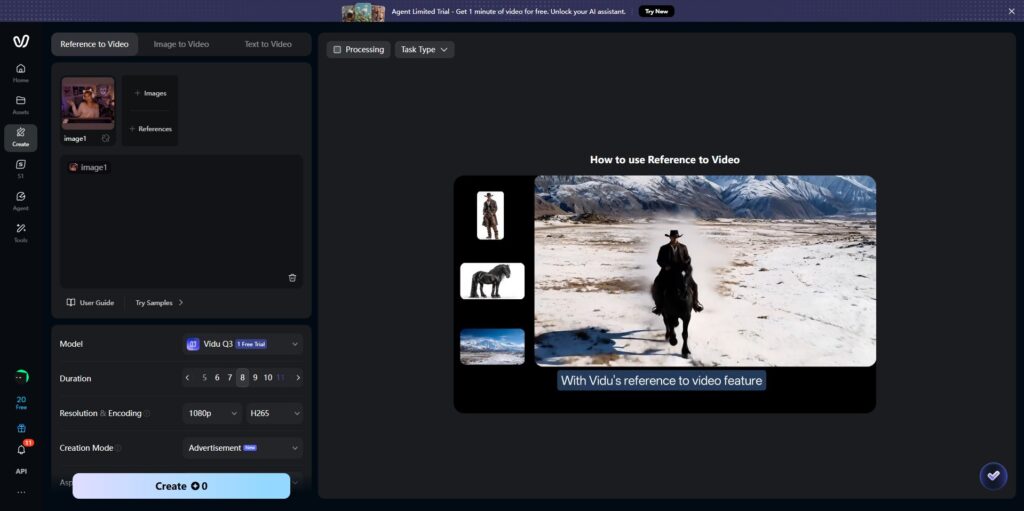
Test One was spot on, AI was prompted to create a video of Ava walking on the beach and it created this 5 second video based on a single image of her.
Test Two went better and is more of what the AI was prompted to create. This 5 second video cost 10 credits to make. This was created with the Image to Video tool by uploading a start frame image and an end frame image.
Runway: Excellent Technology, but the Free Ride Is Short
Runway is one of the more established names in generative video, but its free tier is better viewed as a demonstration than an ongoing free production environment.
Runway currently gives free accounts 125 credits once. Those credits do not refresh when they are gone. The free plan includes 5 GB of asset storage and access to a limited selection of generative tools, although which models are available to free users can change. Videos generated on the free plan also carry a Runway watermark.
That does not make Runway’s free plan bad. It simply changes how I would use it.
Do not burn those credits randomly.
Wait until you have already learned some basic AI-video prompting somewhere that refreshes credits every day, then bring one or two of your better concepts into Runway and see how its models handle them. If the results are dramatically better and you can envision using the platform regularly, then you have learned something useful from your free credits.
If they are not, you have spent nothing. That is exactly what free trials are for. Runway’s own documentation actually reinforces another lesson small businesses should remember. Video consumes considerably more credits than image generation, and longer videos and videos with audio consume still more. A credit balance that appears enormous when you are creating still images can suddenly look very small once you begin generating video.
Runway’s User Interface – I was unable to generate a video with the 500 starter credits provided and was told that there is no AI Video Generation model on the free plan that is available to do the video I wanted. Each model I looked at automatically popped up with the Upgrade information.
Adobe Firefly: Free Daily Generations Without a Clearly Published Fixed Number
Adobe Firefly also belongs on the list, particularly for businesses already working inside the Adobe ecosystem. Adobe currently advertises a free Firefly tier that provides limited free daily generations across images, video, and audio. Unlike Google Flow or PixVerse, Adobe’s public plan information does not currently give one simple fixed number for those free daily generations.
That makes Firefly harder to compare mathematically, but it still makes sense as a free test platform.
Adobe’s paid pricing gives some useful perspective on how quickly AI video can consume resources. Firefly Standard currently includes 2,000 monthly generative credits and describes that allowance as enough for up to approximately forty five-second videos, depending on the model being used.
Again, video is expensive.
That is not an Adobe problem. It is a computing problem.
Generating a still image is one thing. Generating dozens or hundreds of coherent frames while maintaining characters, lighting, movement, objects, camera position, and sometimes audio is vastly more computationally demanding. Whenever someone advertises unlimited or nearly unlimited AI video for a remarkably small amount of money, that is exactly when you should start reading the fine print.
Adobe Firefly User Interface – While I was finally able to get one video created, it used up all of my free generations for the day. The prompt enhancement did not yield anything better than my standard prompt did. The final video is short, there’s a couple of anomalies in it. Not something I would really recommend.
The only successful test of the Firefly service yielded a 5 seconds video that’s only marginally comparable to some of the other services.
I struggled trying to get Firefly to render any kind of video and kept getting met with the “Can’t Load” screen. I had free generations and it seems each failed load cost a free generation as well. The end video while at a full 1080p and 5 seconds, was still not the greatest compared to some of the other services I tried out during this test. Again, not even a contender at this point.
Don’t Pick One Yet
One of the worst habits small businesses develop with new technology is deciding they need a platform before they have identified a problem.
Do not start with, “Which AI video company should my business subscribe to?”
Start with:
What do I want video to accomplish?
Perhaps you want short Facebook and Instagram posts. Perhaps you have excellent photographs but no video. Maybe you want subtle movement behind promotional text. Maybe you need a five-second clip for the top of your website. Maybe you want to create product demonstrations, seasonal promotions, short educational clips, or amusing social content that helps people remember the business.
Those are completely different jobs.
The AI generator that creates beautiful cinematic landscapes may be terrible at keeping your product unchanged. The tool that excels at character animation may struggle with text. One system may preserve faces better. Another may follow camera directions better. Another may create fantastic motion but completely ignore your final frame.
That is why these free plans have real value. Use them against each other. Give the same photograph to Flow, PixVerse, Pika, and Vidu. Give them approximately the same instruction. Compare the outputs. Do not ask which company has the best demo reel. Ask which one produces the best result for your business.
Use the Free Credits to Learn How AI Video Actually Behaves
There is another reason I recommend playing with free services before paying for one. AI video requires a slightly different way of thinking. A person who has never used it tends to write something like: “Make a cool video of my truck.” Then they are disappointed when the AI produces something completely different from what they imagined.
After experimenting for a while, that same person begins specifying what should move, what should remain stationary, where the camera should be, whether the movement should be subtle or dramatic, how the subject should behave, what should happen during the first few seconds, and what the scene should look like when it ends.
That skill transfers between platforms. Every free generation therefore has value even when the resulting video is garbage. You are learning how to communicate motion. That is why a platform giving you fifty credits every day can be more useful initially than an expensive subscription giving you a giant monthly pool. You can learn without feeling like every ugly test just cost another dollar.
Watch the Credit Meter
Free plans also teach you something extremely important before you become a paying customer:
how quickly credits disappear.
That matters because AI companies have invented roughly seventeen thousand different ways to describe credits. One company might charge ten credits for a generation. Another charges sixty. Another charges based on seconds. Another charges based on resolution. Another changes the cost depending upon the model. Therefore, saying that Platform A provides 2,000 credits while Platform B provides 500 tells you absolutely nothing until you know what a useful video costs on each platform.
Credits are not dollars. They are not seconds. They are not videos. They are a platform-specific accounting system. Always ask how many usable finished videos your subscription is realistically producing. And include failed experiments in that calculation.
Don’t Upload Everything You Own Just Because the Tool Is Free
Small businesses should also remember that “free” does not mean “throw every piece of company information into it.”
Before uploading customer photographs, confidential documents, unpublished product information, client records, proprietary designs, or anything else sensitive, understand what the service does with uploaded material and what its current privacy and usage terms say. For ordinary experimentation, use material you are comfortable testing publicly. A photograph of your storefront? Probably reasonable. Your company’s public logo? Fine. A picture of your own product? Usually an obvious test candidate. A spreadsheet containing customer names, addresses, and account information? Maybe don’t feed that into the shiny new AI toy because you wanted to see whether it could make the rows dance. Technology should solve problems, not create brand-new ones.
Free Does Not Mean Finished
There is also a larger misconception worth clearing up. AI video generation does not eliminate editing. A ten-second generated clip may still need trimming, color correction, stabilization, text, music, sound effects, narration, captions, branding, transitions, or another clip attached to it before it becomes useful marketing content. That is not a weakness. It is simply how content production works. Treat AI-generated footage as another raw material. Your camera produces raw material. Stock footage is raw material. Graphics are raw material. AI video is raw material. The finished product still benefits from somebody looking at it and asking: Does this represent the business correctly? Is anything visually wrong? Does the message make sense? Does this feel like something we would actually publish?
That is the same Human-Tempered Content philosophy we use at Valhalla Computers. AI can generate remarkable material quickly, but human judgment still decides whether the result belongs anywhere near the public.
So Which Free AI Video Generator Should a Small Business Try First?
Right now, I would begin with Google Flow because its 50 daily credits and Veo 3.1 Lite pricing provide enough recurring free generations to genuinely experiment. After that, I would add PixVerse because its 60 daily credits give you another continuing test environment. Pika is worth using when you want to compare particular effects or want free downloadable output without a watermark under its current plan. Vidu is useful for reference, image-to-video, and start/end-frame experiments. Runway is worth testing carefully because its free credits are limited and do not regenerate. Adobe Firefly deserves a look particularly if your business already uses Adobe products.
But I would not subscribe to any of them simply because somebody online declared one “the best.” There is no universal best AI video generator. There is only the one that produces what you need, reliably enough, at a cost that makes sense. Fortunately, right now you can answer a surprising amount of that question without paying anything. Create a free account. Upload something you own. Write a prompt. Generate something ridiculous. Change the prompt. Try again tomorrow when the credits refresh. That is how you figure out whether AI video belongs in your business. Not because an advertisement told you it does. Because you actually tried the damn thing. And that remains one of the safest ways to approach any new technology.